
PDF music scores can be printed or downloaded to a computer, iPad®, or other type of tablet.
Writing on a music score is obviously important for teachers and performers alike. We need to circle various elements in the score, add fingerings, etc.
You can download all the PDF music scores from this website to any tablet. This allows you to use a variety of apps to “write” on the music with your finger or a stylus.
If you have an iPad®, you can save any of the PDFs from this website directly to the Apple Books app, which allows you to write on the score. Another free option is Adobe Acrobat Reader. Other options include:
- forScore (forscore.co) – I highly recommend forScore (available in the iTunes® App Store for purchase at $9.99 USD). This app offers more advanced functionality, an easy user interface, and several options for organizing all your digital scores.
- SuperScore (timewarptech.com) Also highly recommended, this free app offers PDF import as a purchased add-on ($4.99 USD), as well as many other interactive features.
Another feature available in many apps is hands-free page turning, in which a Bluetooth pedal is paired with a tablet. Pressing the pedal turns the pages without lifting fingers from the piano. Page turns are also easily done by a tap or swipe of the screen.
How Do I Get Music PDFs onto an iPad®?
- While online, simply tap on the PDF link to download. The PDF will automatically come into view.
- Tap the small box with an arrow pointing up (this is the “share” button).
- From there, you can scroll through and choose from a variety of apps installed on your iPad®. If you have installed one of the apps mentioned in this section, select “forScore” or “SuperScore.”
- The PDF will then be saved to that app, so you can write on it! If you do not this type of app installed, simply choose “Books,” which has markup capability!
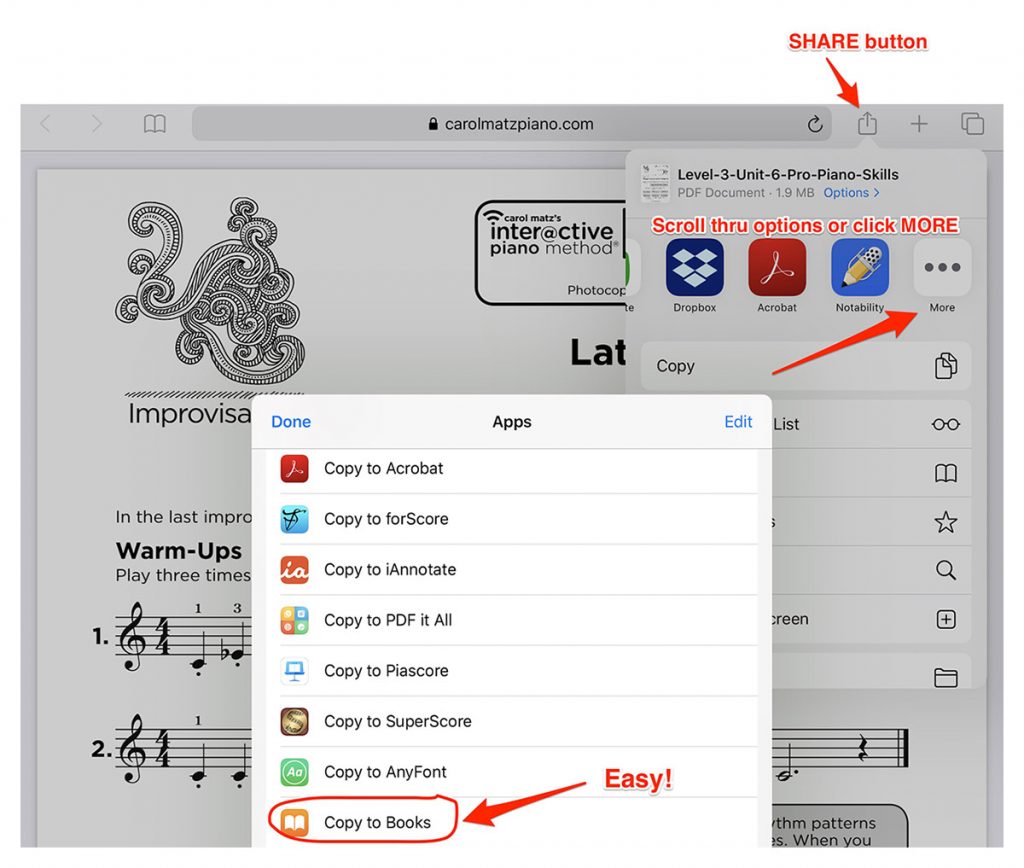
Important: Once you download a PDF to your iPad, you must SAVE it by opening the PDF in an app (such as “Books” on an iPad). This will save it to the device.
This is especially important for the Interactive Piano Method Lesson Book PDF, since downloads are limited.
How Do I Get Music PDFs onto an Android tablet?
- Be sure you have a PDF reader installed. If not, download Adobe Acrobat Reader (free app). Open the Google Play Store. Found in the App Drawer, the Google Play Store is a multicolored triangle pointing to the right. Tap the search bar, type “Adobe Acrobat Reader” and select it. Then, tap “INSTALL.”
- Click on the PDF from this website, then tap the Download button (arrow pointing down) to save it.
- Tap “Adobe Acrobat Reader” when prompted. There will be a pop-up menu asking which program you want to use for this file. If Adobe Acrobat Reader is your only PDF reader, you won’t be prompted… it will just open.
Other recommended apps to read and markup PDFs: Xodo, Drawboard, iAnnotate
iPad® and iTunes® are trademarks of Apple, Inc., registered in the U.S. and other countries.